Lennart Andersen 🐧🐧🐧
gdane0871 at gmail dot com
About me 🐧🐧🐧
Hi, I thought I would put together this little site for myself and others to let them know I am still in the game, or trying to be, it is a work in progress 🤩. I have been working in the IT industry since 1994, when I got my CNE, I did start rather late in this endeavor but it has been very rewarding and I just love working, and tinkering with computers in general, Linux to be more specific, I have always built my own computers since my first one in 1994, a i386 DX40, I have used multiple OS's, like Windows, Mac OSX, gentoo, ArchLinux, libranet, Debian, Redhat, Fedora, and now since 2011 Arch based distros, I can say with certainty, Linux/Arch is my absolute favorite. For sure there are challenges and that is the great thing about Linux, you actually have to use your brain to figure things out. That, in my opinion, is the greatest appeal of Linux to me. No one wants to be a drone..... 🤣
My interests are in no particual order, Linux, Cyber Security, hacking (Figuring out how things work...), Networking, and technology in general.
I've also put together a Scam Awareness page with tips, a message checker, and a practice quiz to help people spot scams.
What I am doing now?
Below is what I am focused on at the moment! 🐧🐧🐧
- Health, family and (education).
- PAUSED, indefinitely; Linux, Cyber Security, Security+, CySA+, Pen+, CEH, & technology.
- Health is the most important thing, I had surgery in 2022, and since then my life has been in turmoil, so much pain; in my arms and neck, and not being able to focus on anything do to that, dizzy, and a whole bunch of other health problems....so to anyone that needs a neck fusion, DON'T do it, it destroyed my health.
My distro of choice! 🐧🐧🐧
I have been using Arch based distros since 2011, Arch Linux is my goto now and it has been for a while.
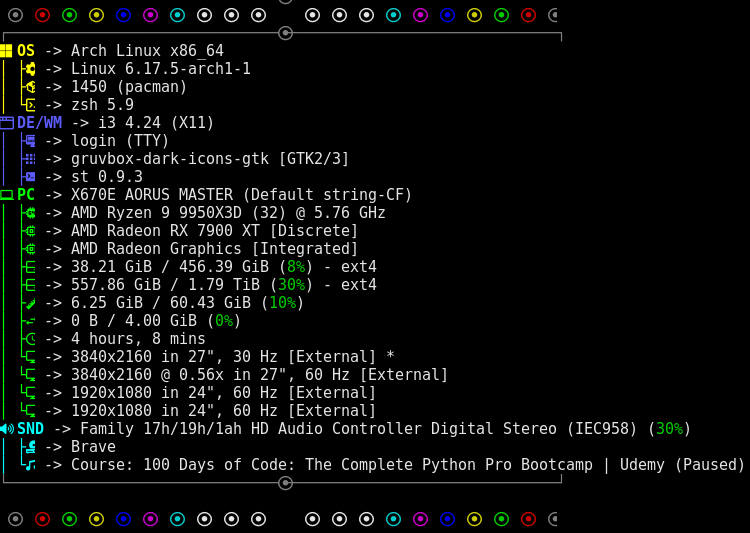
I use i3wm as my desktop, and also on my laptop. This is a tiling window manager, it is in my opinion the best one out there for people that want a specific workflow, it is easy to use and configure. My browser choice, I am a bit torn as I like Qutebrowser a lot, but for somethings it is not very friendly, so I mostly use brave, for the day to day and qutebrowser for everything else. As I also used Mac's once, one utility I missed on ArchLinux was "Dash" it is a great helper tool for any tech person, and "Yes", there is a linux version which is call Zeal, a very cool program, everyone should use it. I use beyond grep ack to find things, this helps a lot if you are looking through logs everyday. File manager is ranger, as it supports, with a hack viewing images in the console.
Shell - zsh - Terminal - st
Zsh has been my shell for a while, and I use the zsh-pure-prompt, it is clean, fast and has some great features.
My terminal of choice is st, small lightweight and very good, I did user rxvt for a long time
Cool Stuff
The terminal keeps getting better. Here is some cool stuff that makes everyday work in the shell a lot faster. These tools are all actively maintained, all in the Arch repos (sudo pacman -S fzf zoxide ripgrep ...), and most of them work on any distro and on macOS too.
- fzf: a fuzzy finder.
Ctrl+Rsearches your history andCtrl+Tfinds files. Turn it on withsource <(fzf --zsh)in your .zshrc. - zoxide: a smarter
cdthat learns the folders you use, soz projjumps straight there. - ripgrep (
rg) and fd: very fast alternatives to grep and find, great for digging through logs. - glances: an all-in-one system monitor showing CPU, memory, disks, network and processes on one screen. I use this one; it is a big step up from
top. - mtr: traceroute and ping combined, updating live, so you can see exactly where a connection slows down or drops packets. Another one I use, e.g.
mtr archlinux.org. - bat and eza:
catandlswith syntax colours and git status. - atuin: your shell history in a searchable database, with optional encrypted sync between your machines.
- tldr: short, practical examples for commands, for when the man page is too much.
- zsh-autosuggestions and zsh-syntax-highlighting: fish-style suggestions and colours as you type.
Aliases and functions still make the biggest difference, for example alias cat=bat and alias ll='eza -l --git'. If you use oh-my-zsh, its plugins (git, archlinux, systemd and many more) are still well worth a look.
Linux, Cyber Security, Hacking, & Edu 🐧🐧🐧
Security News
Training / Edu
AI & Resources
Thor Teaches is first in Training / EDU, for being a fellow Dane. 😃

Bash/Zsh help
Some help for the command line I have used in the past, click on the link to see how to set up and install the tools. 🐧🐧🐧
howdoi is used on the cmd line
cmdfu is from commandlinefu.com
cs is from cheat.sh
Bash/Zsh shortcuts!
Ctrl-a -- Move to start of the line.
Ctrl-e -- Move to end of the line.
Ctrl-y -- Pastes from the clipboard.
Ctrl-l -- Clear the screen.
Ctrl-r -- Reverse history search.
Bash/Zsh aliases!
alias vi=vim
alias svi='sudo vi'
alias ls='ls --color=auto'
alias ll='ls -l'
alias net-scan='sudo arp-scan -l -I eth0'
AI News
AI News
TechCrunch AI
MIT Tech Review AI
VentureBeat AI
AI Weekly
Linux News
LWN.net
Phoronix
Linux.com
It's FOSS
OMG Linux
Logo's 🐧🐧🐧






(Certified: at a point in time, these were all current)
RHCE, NCLP, CCNA, CCNA Security, CNE, MCP, Server+
Disclaimer: Any action and or abuse related to the material contained within this site are solely YOUR RESPONSIBILLTY. The misuse of the information on this website can result in criminal charges brought against the persons in question.